Review Comments (0) Screenshots (4) Questions & Answers (0) Votes (4) Awards (2) Wiki  
(4)
freshwebmaster.com
3.66
www.freshwebmaster.com
Freeware
776 people
Download FreshHTML

4.34 MBDownloaded 1458 times

This software was checked for viruses 5 months ago and was found to contain no viruses.
Click here to see antivirus report.
 
Video tutorial for FreshHTML 2.4
Frame
This video tutorial has been acquired from Downloadtube.com

Review

This is official description

Fresh HTML (Hypertext Markup Language) is a free HTML Editor software for webmaster to create pages for the world wide web. Its WYSIWYG (what you see is what you get) interface makes editing HTML pages as easy as using your favorite word processor. Its built-in editor allows advanced users to fine-tune HTML codes to fit their needs.
Fresh HTML features:
- CSS Styles inspector.
- Tag Attributes inspector.
- Button Generator Wizard.
- Icon packs
- Edit HTML through tree view interface.
- Free Web site / HTML templates
- Spell check
- Easier to create Table
- ActiveX support
- Java Applet support
- Create marquee (running text), non W3C standard
- Preview in browser
- Background sound linking support (*.mid, *.wav, *.au), non W3C Standard
- JavaScript/VBScript Files (*.js & *.vbs) linking support
- JavaScript/VBScript editing support
- Support media player, quick time, real media, and flash movie files
- Easier to set auto-refresh for URL self or any URL
- Easier to set robots meta
- Easier to set URL base and window target base.
- Easier to set LINK: StyleSheet, Default Icon, Next, Prev, etc.
- Easier to fill in Meta keywords, description & author. You can use it to optimize your site in search engines's position.
- Scheme color template for background, text, link.
 
The following review written by one of the Software Informer contributors applies to version 2.4

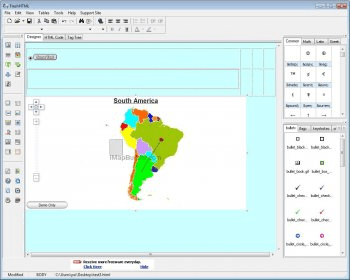
Fresh HTML: An HTML editor for editing and creating web pages in a simple and easy way. User interface is easy enough to guide anybody to create step by step a web page by means of its interface WYSIWYG -what you see is what you get- very useful also for editing existing web pages.

The application has two view modes: Designer and HTML code. Designer mode shows the edited page the way it will look on the Internet browser, using a built-in editor. HTML code displays the corresponding code for inserting or correcting scripts.

The software has the possibility of adding Common special symbols or characters, Math symbols, as well as Latin and Greek special characters.

This simple editor offers the capacity of inserting Forms, Input texts, Password, Buttons, Check boxs, Radio buttons, Lists, List boxes, etc. with a simple click. Also, the editor offers a simple way for inserting Flash movies and Real media components.

A general Properties window, allows the user to set the Page properties: background, tittle, colors, hyperlink colors (Normal, Visited and Active), adjust the four possible page margins, meta names, author, etc.

This editor is an easy to use tool for creating and editing web pages.
  • Very easy to use and small application for editing web pages.
  • There's no way to get the Help file.

Reviewed by: Ignacio Solves

Reviewer rating:

Reviewed: 3 years ago

What's new in version 3.6

-more web site templates.
Report a wrong version Report a wrong program title Suggest a correction

Screenshots

Main window Main window Initial code window Initial code window Designer view window Designer view window Page properties Page properties

Latest comments


There are no comments, be the first one!
Add new comment

E-mail Address:

Password:

Register now »

Forgot password?

Sign in with:
Download Software Informer Client
Copyright © 2012, Informer Technologies, Inc. About| Privacy and terms| Help| Feedback & Support| Partners program